

Blog
How to reboot FARGO HDP5000 Printer?
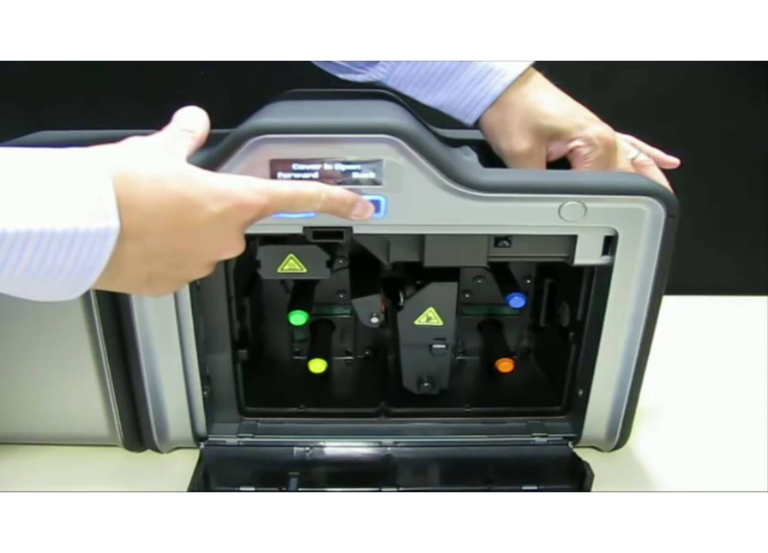
In order to reboot a FARGO HDP5000 printer. First of all:
- Unplug the power the printer for 10 seconds then plug back in.
- This simple power cycle is the standard way to restart the printer and can help resolve minor errors, including some card jams.
Steps to reboot the printer
- Unplug the power cord: Disconnect the power cord from the back of the printer.To reboot a FARGO HDP5000 printer, unplug the power cord, wait for at least 5 seconds, and then plug it back in.
- This simple power cycle is the standard way to restart the printer and can help resolve minor errors, including some card jams
- Wait: Allow the printer to remain unplugged for at least 5 seconds to ensure it fully powers down
- Reconnect the power cord: Plug the power cord back into the printer. The printer will go through its startup sequence
📞 For technical: +92-303-786-2488
When to take further action
- If the problem persists after rebooting, check for any jammed cards. If you have a jam, you may need to open the printer’s front cover, remove the ribbon and film cartridges, and then carefully clear the card path.
- In some cases, the “Forward” and “Back” buttons on the printer’s open cover can be used to manually advance or reverse the card path rollers to help remove a jam.
- If issues continue, consult your printer’s manual or contact technical support for further assistance.
- HID FARGO HDP6600 Card Printer & Encoder
- How to fix card jam FARGO DTC1250e?