

Blog
HID FARGO Printer Error 88
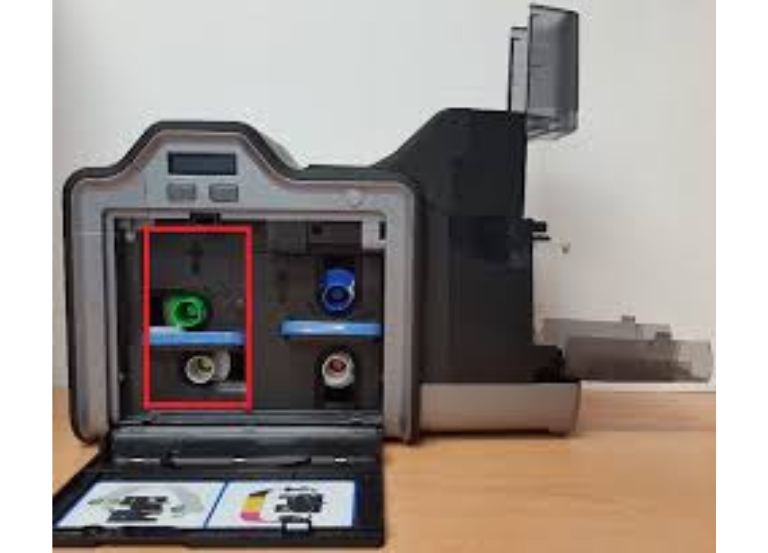
The HID FARGO Printer Error 88 (specifically identified in HDP5000e/HDP5600 models) generally indicates a Card Jam in the Prox (Proximit Card) Encoding Area. This indicates a card has become stuck while attempting to be read or encoded by the printer.
Some of steps to resolve this issure that based on typical FARGO printer troubleshooting:
Immediate Troubleshooting Actions
- Clear the Jam: Open the printer, remove the film and ribbon cartridges, and carefully remove any jammed cards from the print station or flipping area.
- Check for Small Cards: Ensure that the cards are not slipping or that a broken piece of a card is not lodged in the encoder, particularly if you are using proximity cards.
- Restart and Resume: Power off the printer, wait a few seconds, turn it back on, and press the Resume or Cancel button on the LCD panel to clear the error.
✅ 📞 For technical supports: +92-303-786-2488
Advanced Troubleshooting
If the error persists after clearing the physical jam, it may be due to a misaligned sensor or a need for maintenance:
- Run a Cleaning Cycle: A dirty printer can cause cards to stick or misfeed. Run a cleaning cycle to ensure the rollers are clean.
- Update Firmware/Driver: Ensure your printer firmware and driver are up to date, as this can fix communication issues between the printer and computer.
- Check Sensor Calibration: If the error continues, it might be a false error indicating a calibration failure. Perform a film or ribbon calibration to ensure sensors are working correctly
What is error 93 on FARGO printer?
- The print ribbon installed in the printer does not match the ribbon type selected in the printer driver. Change either the installed print ribbon or the ribbon type selected in the printer driver.
- Press the Pause button to continue or the ON/OFF button to cancel.
-
What is error 240 card printer?
How to fix error code 93?
If you can, go to Manage Devices in your Account settings to view the most recently active devices on your account or to log out of all devices. If you are currently using a VPN, go to your device settings and disable it.