

Blog
How to use a digital persona fingerprint scanner?
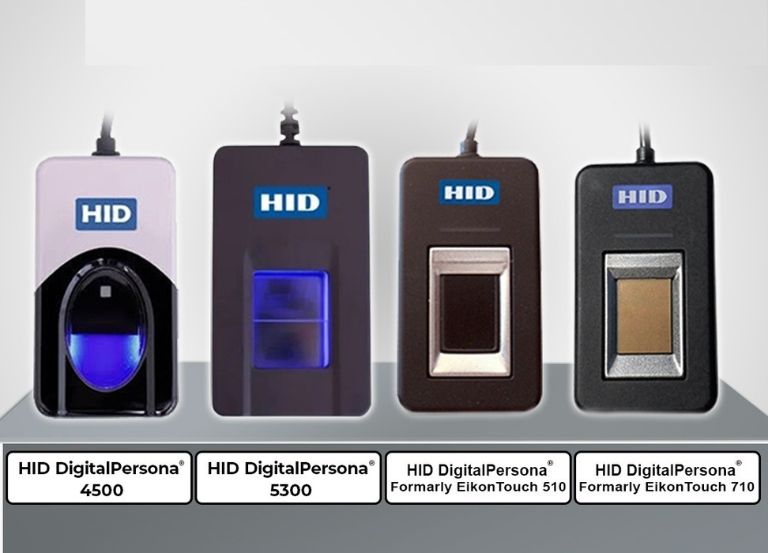
Utilizing a DigitalPersona fingerprint scanner, such as the commonly utilized U.are.U 4500, entails three primary steps: installing the device drivers, registering your fingerprint within the software, and scanning your finger for authentication.
1. Installation
- Plug in the scanner: Attach the device to an accessible USB port on your computer.
- Install the Drivers: Typically, windows automatically installs the required drivers, often through windows Update. If this does not occur, you can obtain the suitable WBF (Windows Biometric Framework) or standard driver from the HID Global Support Page.
2. Fingerprint Enrollment
- Open the Software: Initiate the DigitalPersona software (or access Windows Settings for Windows Hello).
- Add a Credential: Go to the “Credential Manager” or “Sign-in Options” and select the option to add or enroll a new fingerprint.
- Scan Your Finger: The application will prompt you to position a finger on the scanner.. To get a successful scan:
- Place the pad of your finger—not just the tip—flatly onto the glass.
- Apply gentle, firm pressure.
- You will likely need to lift and touch the sensor multiple times (e.g., 4 to 5 times) so the software can capture different angles.
Save: Ensure you click “Save” or “Done” to finalize the enrollment.
3. Daily Usage & Tips
- Authenticating: When your PC or compatible application requests it, just position your registered finger securely and flatly on the scanner.
- Optimal Performance: If the scanner is unable to read your fingerprint, please verify that both the scanner window and your hands are clean and dry. The silicone coating on DigitalPersona readers enables them to recognize different types of fingerprints; however, excessive moisture or dirt may lead to reading errors.
For a visual guide on downloading the drivers and completing the enrollment process